Ah, real pieces. Now it’s personal.
duolinko
Play Oscar on your Chessnut Go.
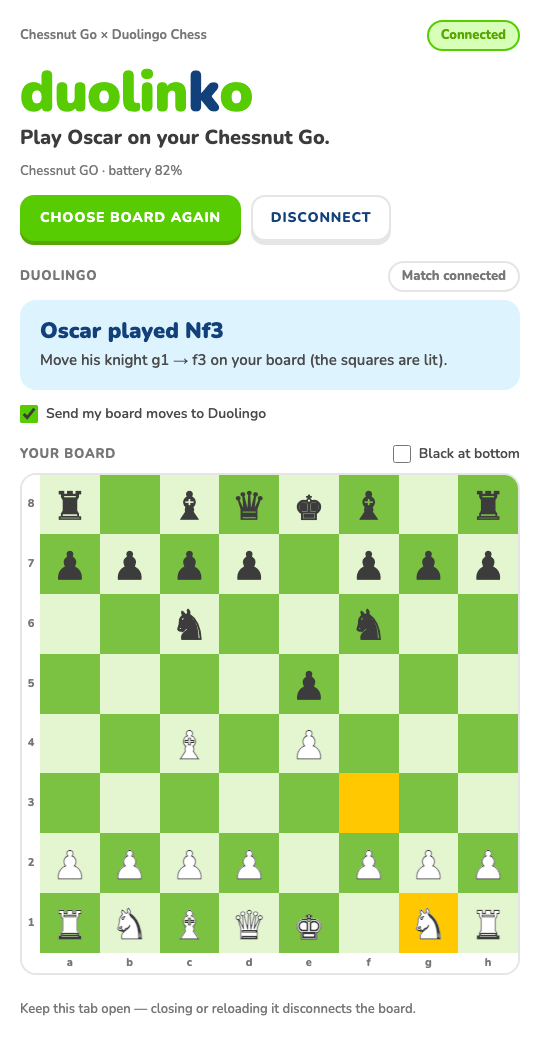
Duolinko connects your Chessnut Go chessboard to Duolingo Chess. Move real pieces, and your moves go straight into your match against Oscar. His replies light up on the board.
Free · Desktop Chrome · No account, no data collected
How it works
You play in Duolingo Chess as usual: same matches, same Oscar, same rating. Duolinko simply puts your physical board in charge of the mouse.
Connect your board
Click the Duolinko icon in Chrome, press Connect board and pick your Chessnut Go. The tab stays open while you play.
Start a match against Oscar
Open Duolingo Chess in another tab and play Oscar. Duolinko follows the game, whether you're White or Black.
Play on real pieces
Make your move on the board and it's entered on Duolingo for you. When Oscar replies, his from and to squares light up so you can copy his move.
Everything stays in sync
Duolinko watches both boards all the time. If they ever disagree, it stops and shows you what to fix. It never guesses.
Your moves, entered for you
Captures, castling, en passant and promotions are recognised from the pieces you move.
Oscar's moves light up
The board's lights show where his piece came from and where it went, castling included.
Mismatches are flagged
A piece in the wrong place? Duolinko pauses and lights the squares to fix. You can never send a move from the wrong position.
Check blinks
When you're in check, your king's square blinks so you can't miss it.
Promotion by swapping pieces
Replace the pawn with the piece you want. Duolinko tries to pick it in Duolingo's pop-up, and asks you to click it if it can't.
Ready for the next game
After the match, the board lights the pieces still out of place until it's set up again. It reconnects by itself if the board drops out.
What you need
That's all. There's nothing to sign up for.
- Chessnut GoThe board Duolinko is built and tested with
- Desktop ChromeVersion 116 or later
- BluetoothBuilt into most laptops
- Duolingo ChessYour usual Duolingo account
Install
Duolinko is on its way to the Chrome Web Store.
From the Chrome Web Store
Once the listing is live, it's one click: Add to Chrome, then pin the green k to your toolbar.
Then, every time you play
- Switch on your Chessnut Go.
- Click the k icon and press Connect board.
- Start a match against Oscar in Duolingo Chess.
- Play on the board. Keep the Duolinko tab open.
Support the project
Duolinko is free and made in spare time. If it makes your games more fun, you can say thanks with a coffee. It keeps the updates coming.
Questions
Is Duolinko made by Duolingo?
No. It's an independent project and isn't made, endorsed or supported by Duolingo or Chessnut. It uses Duolingo's normal chess board on the page, entering your moves as ordinary clicks.
Does it play for me?
No. There's no chess engine. Every move comes from you, on the physical board. Duolinko only transfers it to Duolingo and shows you Oscar's replies.
Which boards work?
Duolinko is built and tested with the Chessnut Go. Other Chessnut boards use a similar connection but haven't been tested.
What if my board and Duolingo disagree?
Duolinko stops sending moves, tells you which squares differ, and lights them on the board. Fix the pieces and play carries on.
What if the Bluetooth connection drops?
Duolinko reconnects by itself and checks the board against Duolingo before carrying on.
Does it work in lessons or against friends?
It's made for matches against Oscar. Lessons and player-versus-player games aren't supported.
Why does the tab need to stay open?
Chrome only allows the Bluetooth connection from an open page, so the Duolinko tab holds the link to your board. Pin it and forget about it.
Privacy
Duolinko does not collect, store or transmit any personal data. It has no servers, no accounts and no analytics.
It reads the chess match shown on duolingo.com and talks to your Chessnut Go over Bluetooth, entirely inside your browser. It doesn't save anything about you.
Questions or problems? Email duolinko.support@gmail.com.